Why a SharePoint timesheet
Your people already sign in to Microsoft 365, and IT already governs SharePoint. A timesheet that runs as a SharePoint page needs no new accounts. Its data is covered by the same permissions, retention and backup as the rest of the site.
What you get
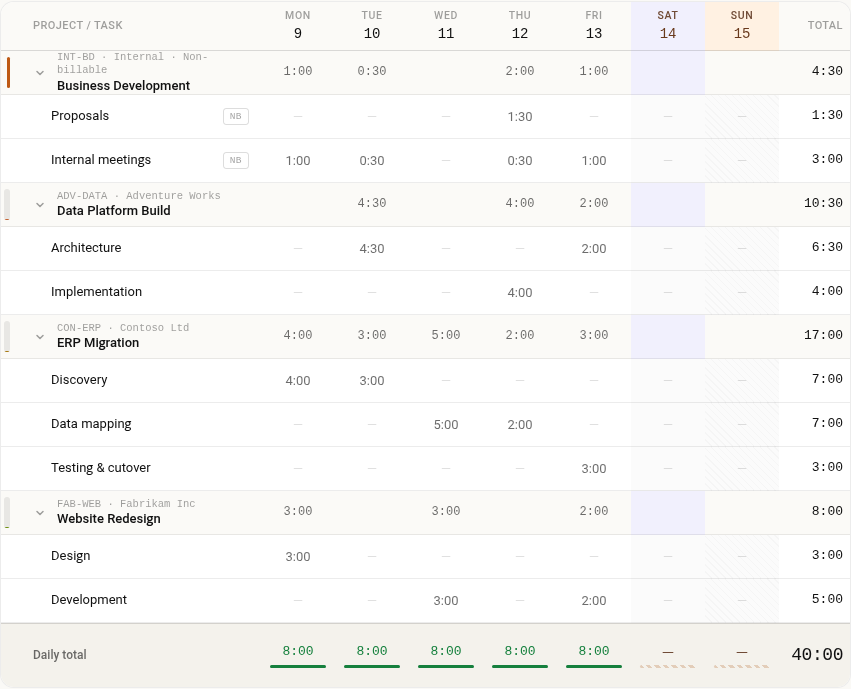
- A week on one screen. People fill in their week in a single grid, one row per project and task, and can copy last week when it was similar.
- Approvals. Each week goes to the person's manager, the one already set in Microsoft 365, who approves it or sends it back with a reason. Both sides get an email.
- Reports. See where the hours went and how much was billable, then export the detail to Excel for payroll or invoicing.
- Your setup, your rules. Admins keep the client and project list, holidays and time rules, and can bring existing lists over from a spreadsheet or SharePoint.
- No server to run. Timesheet sets up its own lists the first time an admin opens it.
How it gets into your site
- Upload the package to your tenant app catalog and enable it.
- Approve its four API permissions in the SharePoint admin center.
- Add a page from the Timesheet full-page app template, and let the first run create the lists.
The install guide covers every step, and the security page lists the permissions and what the app sends to Akora. That is a licence check, with no timesheet data.